
Download BriseStream.
Version 1.0 is in preparation, so there is nothing to download yet. Here is what you will get, how to check it, and how to be told the day it ships.
BriseStream for Windows
Be told the day it ships.
We do not collect e-mail addresses for this. GitHub already does the job.
Open the repository
Watch releases
Choose Watch, then Custom, then tick Releases. You need a free GitHub account.
Get the mail
GitHub e-mails you when a release is published. That is the first build, with its installer and its checksums.
What you will download.
- Installer
BriseStream-<version>-setup.exe. Installs for your user only, with no administrator prompt. Uninstalling leaves your settings and recordings where they are.- Portable
BriseStream-<version>-portable.zip. With the fileportable.txtnext to the program, settings stay in adatafolder beside it and nothing else is touched.- Stream keys
- Kept in the Windows Credential Manager in both cases, so they do not travel with a portable folder.
- Size
- 10.6 MB at the last accepted build (4 Nov 2026). The budget is 25 MB.
- Licence
- GPL-3.0-or-later. Third-party notices ship in both packages.
Windows will warn you, at first.
The first packages will not be code-signed, because signing needs a certificate in the name of whoever publishes them. Until that exists, Windows SmartScreen shows a warning on download. Checking the SHA-256 sum below is how you know the file is the one the project built.
Requirements
- Windows. The virtual camera needs Windows 11.
- A graphics card with a video encoder: NVIDIA NVENC, AMD AMF or Intel QuickSync. Without one, a software H.264 fallback uses your processor and says so.
- Linux and macOS come after Windows, with no date yet.
Check what you downloaded.
Each release carries a SHA256SUMS.txt next to the installer and the portable archive.
Windows PowerShell
Compare the printed hash with the line in SHA256SUMS.txt.
Get-FileHash .\BriseStream-<version>-setup.exe -Algorithm SHA256
Linux, macOS, Git Bash
Prints OK for each file you downloaded.
sha256sum --check --ignore-missing SHA256SUMS.txt
The sums sit on the same release page as the files. They show that a download is complete and is the file the project's CI built; they do not show that the release page itself is genuine.
The first start takes a few minutes.
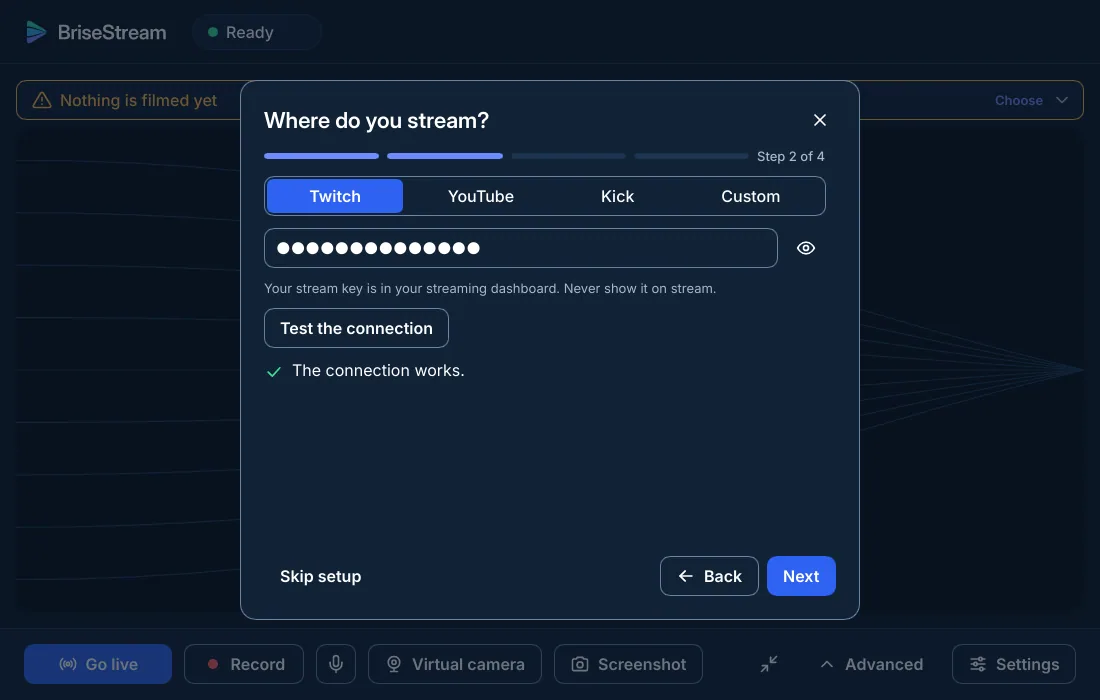
A short wizard looks at your graphics card, asks what you want to do (stream, record or both) and proposes settings that stay light on your game. You can run it again from Settings.
- Record writes to your Videos folder; the file is safe at any moment
- Go live needs a stream key, or a Twitch sign-in
- Coming from OBS? Settings, Import reads your scene collections
Before you wait
Is there a beta I can try?
Not publicly. Version 1.0 is in preparation, and nothing is offered for download until it ships.
Does BriseStream phone home?
Nothing is sent unless you ask. The update check is off until you turn it on; when on, it downloads one small file, and it never downloads or runs a program.
Will my settings survive an update?
Settings are versioned and migrated, and copied before a new version is announced.
Read next · BriseStream vs OBS Studio · Streaming software for a low-end PC
Want a stream look while you wait?
Ten ready-made packs ship with the app. A custom pack from the studio costs €19.